|
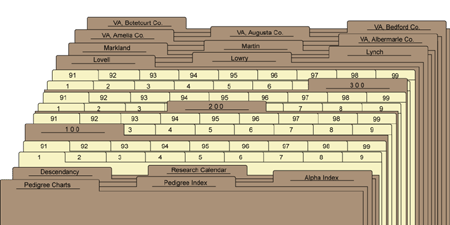
I mentioned previously that prenumbered tabs are
available, which are numbered 1 through 99. These would work perfectly for the
first 99 FRINs, but what about number 100? Also available as part of the
packages here, are divider tabs with clear
labels. When you reach number 100, just create a divider tab that is labeled as
100. Then after this tab, the set of 99 can be inserted. I know that this set of
99 is part of the 100s because of the divider tab that says 100.
Now that you have an overview of how the MyTrees.com online program can assign and print the numbers to easily organize the evidence you have gathered over the years, study the image above. Notice the introductory tabs that act as finding aids for the materials which follow. Notice that this is a "shortened" image depicting the filing system for someone with at least 300 family group records. Behind that are surname files for Lowell, Lowry, Lynch, Markland, and Martin families; and locality tabs for several counties in Virginia. This system works as a time-saver, a method appreciated by archives and libraries as a way to donate your research, and a great way to preserve your materials.
Also available are various packages to meet your needs including instructions. This system has been used by thousands of professional and hobbiest genealogists. It works very well, and looks so professional.
| Previous Page |
Next
Page |
|

